Receiving Inmarsat AERO ACARS
Introduction
Inmarsat operates a global network of geostationary satellites that provide communication services for aviation, maritime, and other remote industries. Unlike terrestrial networks, geostationary satellites remain fixed over a specific point on the Earth's surface, allowing continuous coverage of a region. This makes them ideal for applications where real-time communications are critical, such as aircraft operations and ship navigation.
In the aviation sector, airlines and air traffic services rely on Inmarsat satellites to exchange messages, voice calls, and data between aircraft and ground stations. These communications cover everything from routine position reporting and flight planning to weather updates, maintenance alerts, and safety-critical messages.
Inmarsat AERO channels are the satellite-based extension of ACARS. These channels provide global coverage by relaying ACARS messages through Inmarsat satellites:
- Aircraft transmit data to the satellite using an L-band uplink (~1.6 GHz)
- The satellite relays the signal back to a ground station, which forwards the message to airline operations centers or air traffic control
Ground-to-aircraft transmissions also occur in the L-band around 1.5 GHz, which makes them relatively accessible to radio enthusiasts using inexpensive Software-Defined Radio hardware.
In addition to basic ACARS data, Inmarsat AERO channels can carry higher-bitrate transmissions for voice communications (such as pilot-to-ground calls) and more data-intensive applications, making them a rich source of real-time aviation telemetry for SDR enthusiasts.
Satellite Coverage
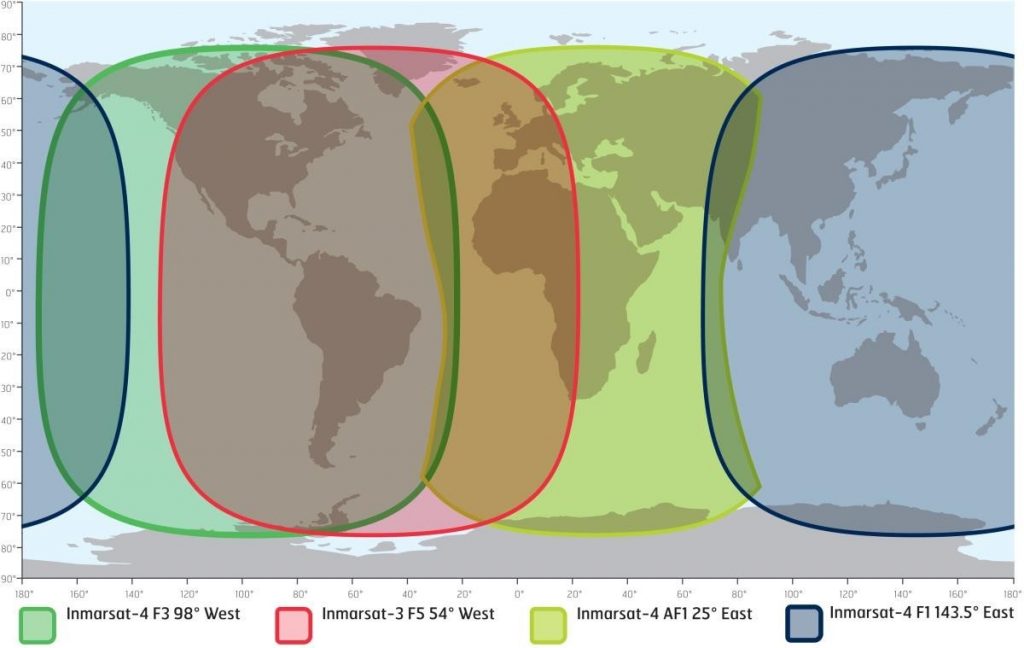
The Indian Ocean region (IOR) is served by the geostationary satellite located at 143°E longitude, currently the Alphasat-4 F1. Geostationary satellites orbit at approximately 35,786 km above the equator, allowing them to remain fixed relative to the Earth's surface. This provides continuous coverage of a large area, unlike low-Earth orbit satellites, which move quickly across the sky.
Coverage Area
The 143°E satellite provides:
India, Southeast Asia, Middle East, eastern Africa, Australia
Portions of the Indian Ocean, South Asia, and adjacent maritime regions
The exact coverage depends on the satellite's transponder beam footprint, which is designed to maximize service in regions with dense aviation and maritime traffic.
Historical Context
The Inmarsat I-4 series, including I-4 F1, represents the second-generation geostationary satellites replacing earlier I-1 and I-3 generations. Key improvements include:
- Greater transponder capacity, supporting more ACARS channels and voice traffic
- Enhanced beam shaping, allowing reliable communication in both dense and remote regions
- Extended lifespan, typically 15 years, ensuring continuous service for aviation and maritime operations
AERO ACARS Channel Types
Inmarsat AERO uses L-band channels to transmit ACARS messages and other data. Each channel has a defined bitrate and typical usage, which affects both traffic volume and decoding difficulty.
| Bitrate | Typical Usage | Notes |
|---|---|---|
| 600 bps | Low-rate ACARS messages | Usually used for routine position reports and simple operational messages. Easy to decode even with a small directional antenna. |
| 1200 bps | Standard ACARS messages | Higher throughput for more frequent messages or slightly larger payloads. Easy to decode even with a small directional antenna. |
| 8400 bps | Voice communications (AERO phone) | Primarily used for pilot-to-ground voice calls or satellite phone traffic. Frequencies may shift dynamically, making reception unpredictable. |
| 10500 bps | High-speed data | Used for bulk data transmissions, maintenance logs, or airline operations systems. Requires good SNR and clean reception. |
AERO ACARS Frequencies (143°E IOR)
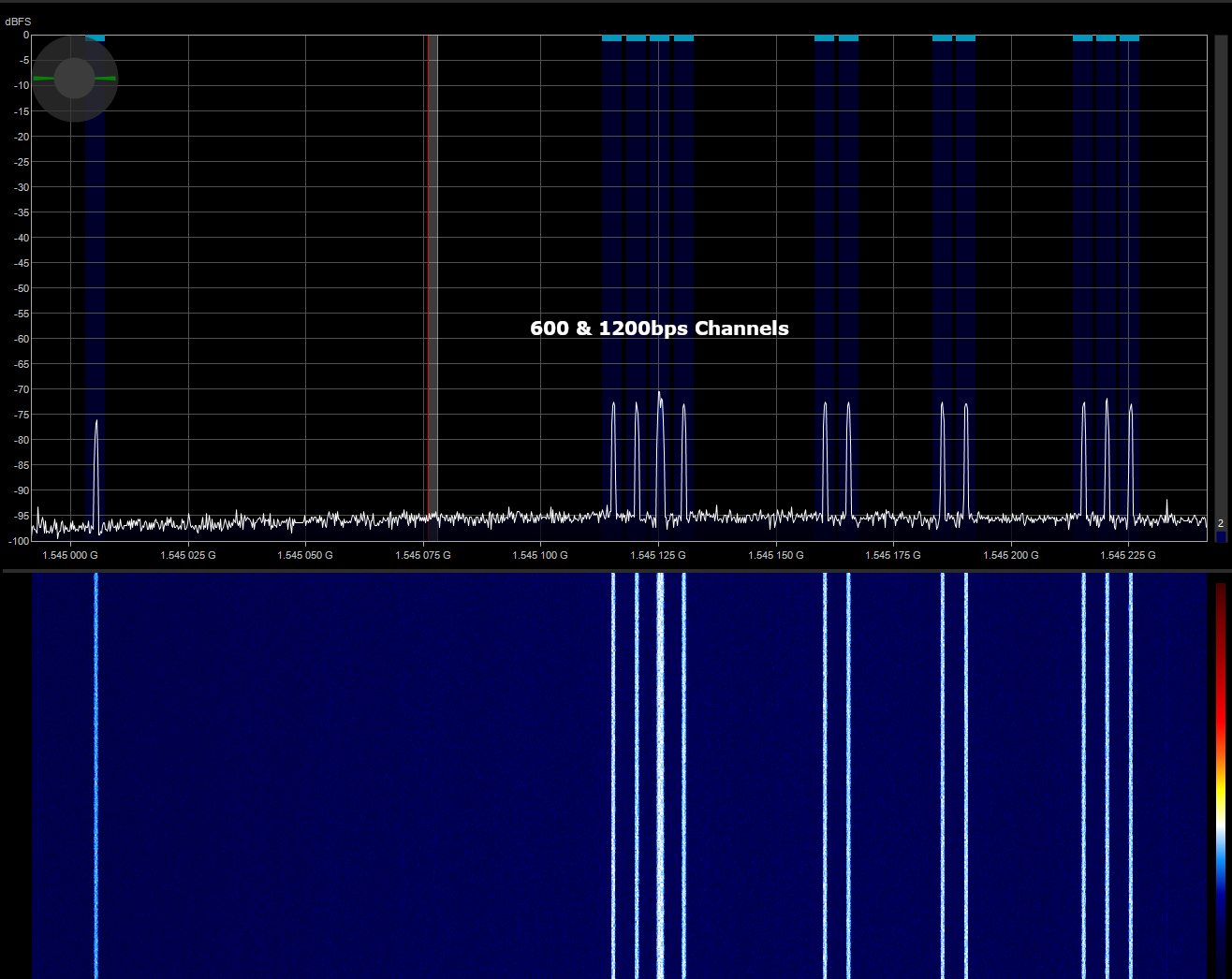
The Indian Ocean region satellite (143°E) provides multiple ACARS channels across different bitrates.
600 bps Channels
| Channel | Frequency (MHz) |
|---|---|
| 600bps-01 | 1545.0032 |
| 600bps-02 | 1545.1131 |
| 600bps-03 | 1545.1182 |
| 600bps-04 | 1545.1283 |
| 600bps-05 | 1545.1582 |
| 600bps-06 | 1545.1634 |
| 600bps-07 | 1545.1834 |
| 600bps-08 | 1545.1884 |
| 600bps-09 | 1545.2131 |
| 600bps-10 | 1545.2182 |
| 600bps-11 | 1545.2232 |
1200 bps Channels
| Channel | Frequency (MHz) |
|---|---|
| 1200bps-01 | 1545.1233 |
10500 bps Channels
| Channel | Frequency (MHz) |
|---|---|
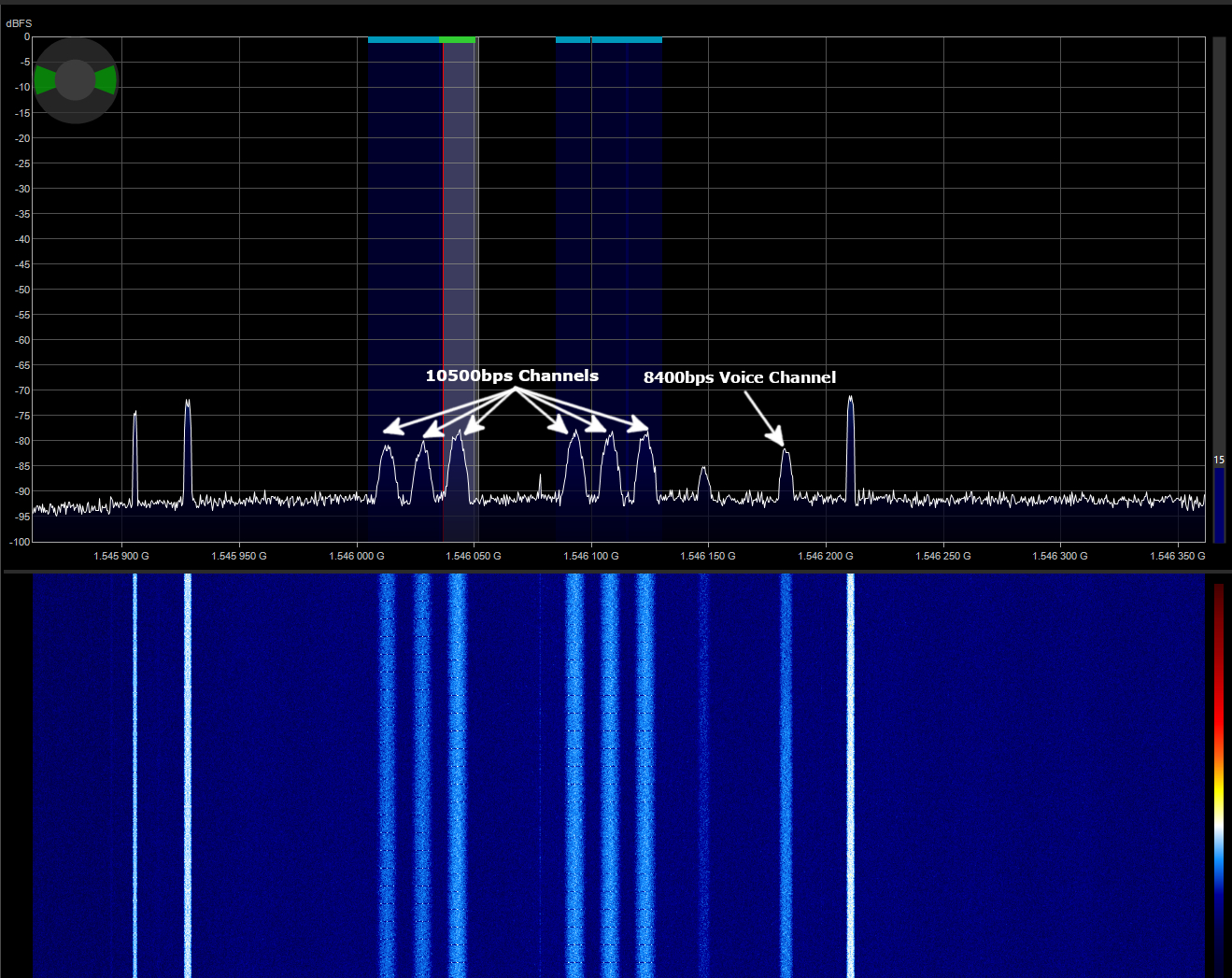
| 10500bps-01 | 1546.0049 |
| 10500bps-02 | 1546.0205 |
| 10500bps-03 | 1546.0353 |
| 10500bps-04 | 1546.0848 |
| 10500bps-05 | 1546.1004 |
| 10500bps-06 | 1546.1149 |
8400 bps Voice Channels
These channels are mostly used for pilot-to-ground voice or satellite phone calls. Unlike the other fixed ACARS channels, 8400 bps channels are dynamic:
1546.125 – 1546.200 MHz
- Frequencies can shift within this range
- Channels may appear simultaneously or overlap, depending on satellite traffic
Hardware Setup
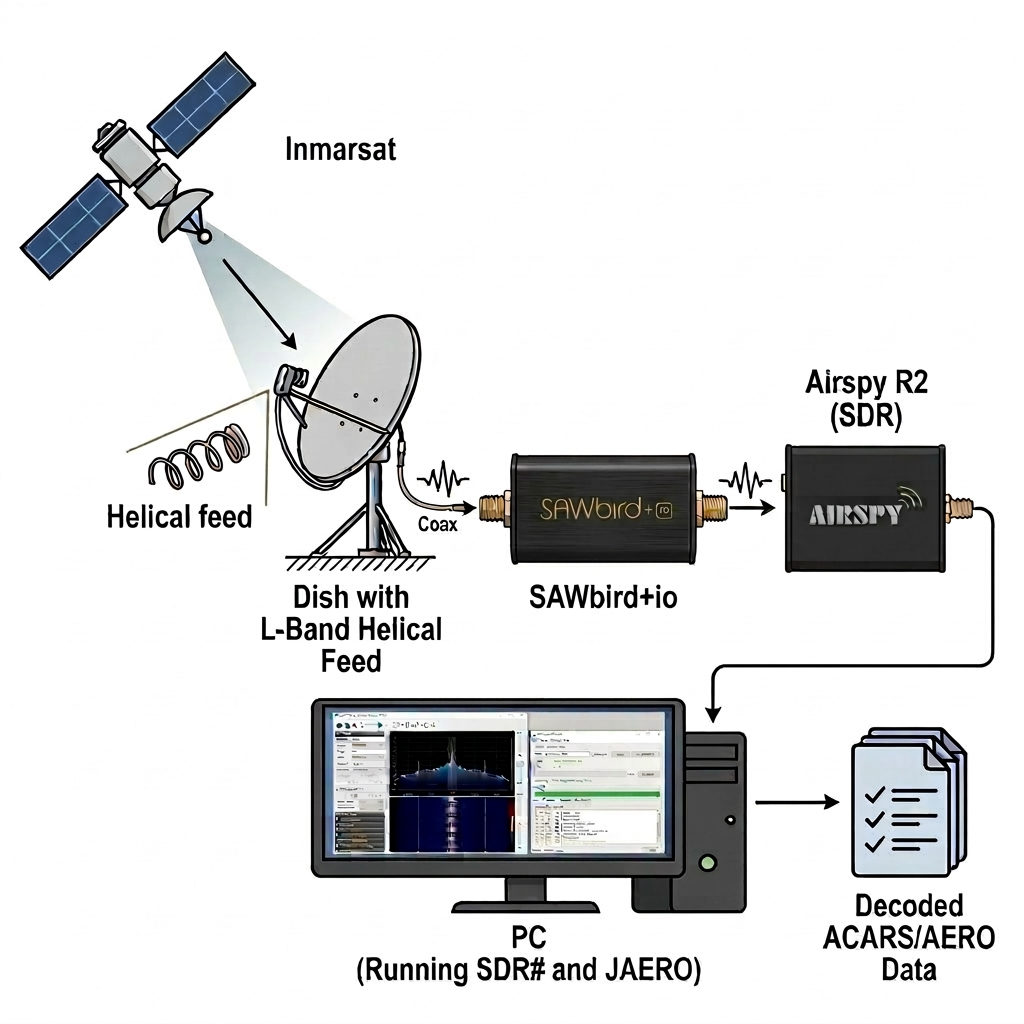
My setup looked like this:
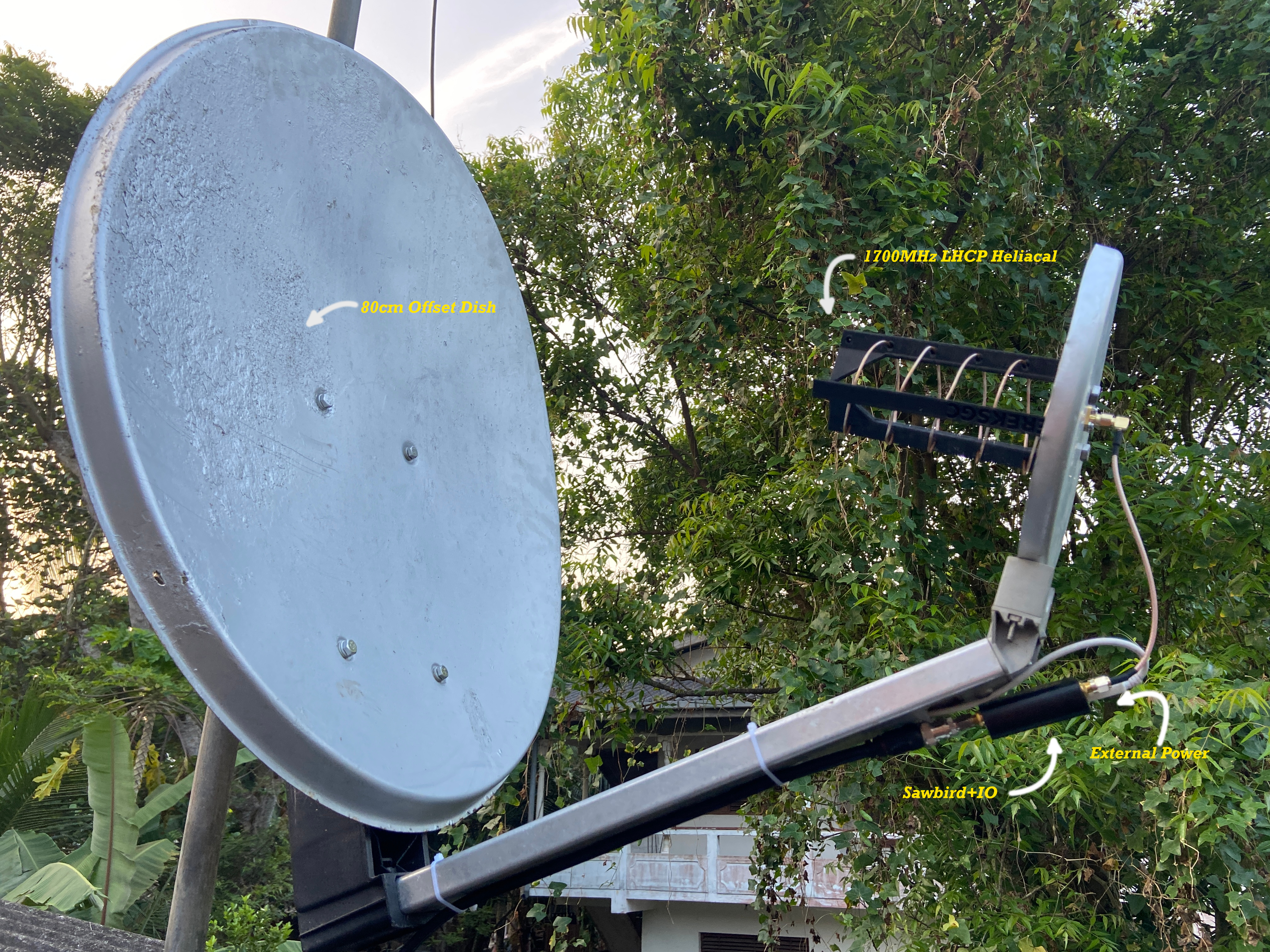
Built-in LNA, powered via SDR bias-tee. Good for 600/1200 bps channels.
Advanced Setup
A more capable setup involves:
For increased gain and directivity
3D-printable design for L-band
Improve signal SNR
"1700L_5.5T_0.14S_4D_10-90M.stl" Download here

Software Setup
Three pieces of software are required:
| Purpose | Software |
|---|---|
| SDR receiver | SDRSharp or SDR++ |
| Audio routing | Virtual Audio Cable |
| Decoder | JAERO |
Basic Decoding Workflow
- Connect the SDR to the computer
- Start the SDR software
- Tune to one of the AERO ACARS frequencies
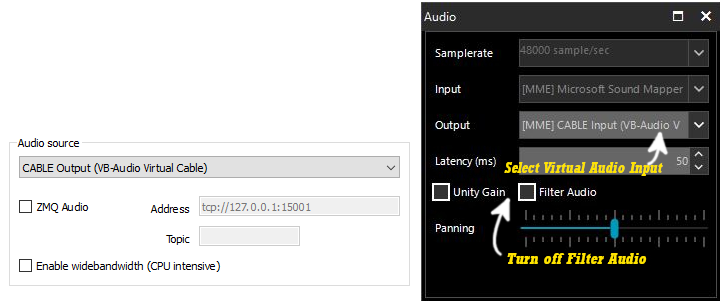
- Route audio output to Virtual Audio Cable
- Configure JAERO to use the same virtual audio device
Recommended Bandwidth Settings
| Channel Type | Bandwidth |
|---|---|
| 600 / 1200 bps | 4 kHz |
| 8400 bps | 10 kHz |
| 10500 bps | 15 kHz |
Decoding Multiple Channels Simultaneously
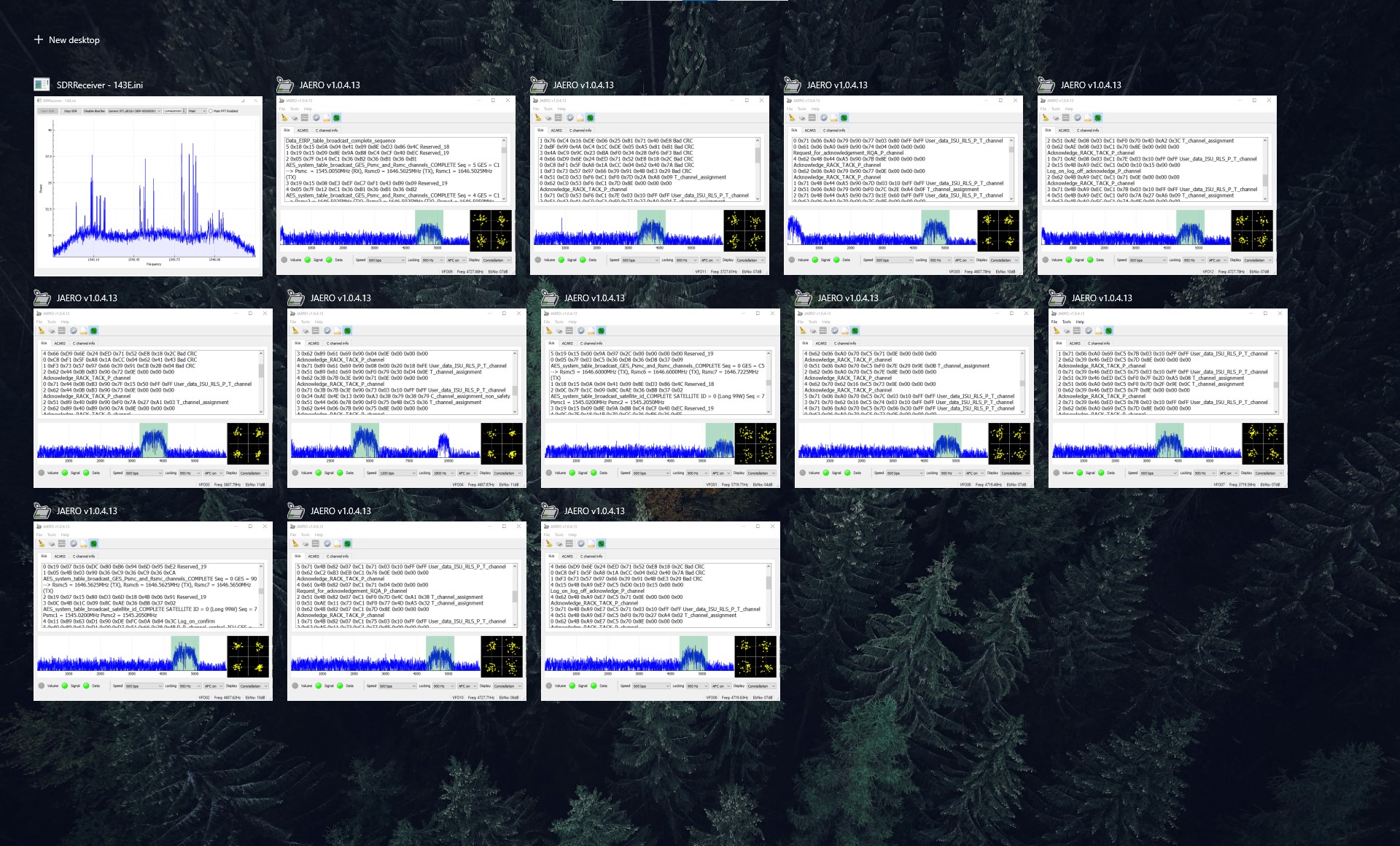
Decoding a single channel works well, but the Inmarsat band contains many active channels. To monitor several channels simultaneously, a different approach is needed.
Download 143E.ini
Voice Channels
The 8400 bps channels typically carry voice communications.
These may include:
Operational communications between aircraft and ground stations
Passenger or crew satellite telephone communications
Flight operations and coordination traffic
The following example shows a decoded voice transmission:
Final Thoughts
Inmarsat AERO ACARS signals are one of the easiest & rewarding satellite communications to receive using inexpensive SDR hardware.
With a modest antenna, low cost SDR, and freely available software, it is possible to monitor aviation data links transmitted thousands of kilometers away from geostationary satellites.