Decoding VDL2 - The Next Generation Aviation Datalink
Introduction
For decades, ACARS (Aircraft Communications Addressing and Reporting System) has been one of the most recognizable digital data systems used in aviation. Traditionally transmitted over VHF using simple MSK modulation at 2400 bps, ACARS allowed aircraft and ground stations to exchange short messages such as flight plans, weather reports, position reports, maintenance data, and operational instructions. It was a huge step forward from voice-only communication, reducing cockpit workload and improving airline operational efficiency.
But as air traffic increased and the demand for data communications grew, legacy ACARS began to show its age. The system was relatively slow, inefficient in its use of spectrum, and increasingly congested in busy airspace. To address these limitations, the aviation industry introduced VDL Mode 2 — short for VHF Data Link Mode 2.
VDL2 was designed as a more modern and efficient replacement for conventional VHF ACARS data links. While it continues to support many of the same operational message types, the underlying technology is significantly more advanced. Instead of the older ACARS modulation scheme, VDL2 uses D8PSK (Differential 8-Phase Shift Keying) and operates at a much higher data rate of 31.5 kbps, making it far better suited for the growing volume of airline and air traffic communication traffic. It typically operates in the civil aviation VHF band alongside traditional ACARS channels, but with a very different signal structure and protocol stack.
Compared to regular ACARS, VDL2 offers several clear advantages. Its higher throughput allows more data to be transferred in less time, channel efficiency is improved, and the system handles heavier traffic loads much better in dense airspace. It also supports more structured networking methods rather than the relatively simple character-based message style used by classic ACARS. For airlines, service providers, and air navigation authorities, this means better scalability and improved performance as communication demands continue to grow.
In practice, both systems have coexisted for many years, with classic ACARS still widely active while VDL2 continues to serve as a more capable digital layer for modern aeronautical communications.
VDL2 Signal Structure
On an SDR spectrum display, VDL2 appears as a relatively wide, solid-looking digital signal in the VHF airband, typically centered on one of the standard VDL2 channels such as 136.725 MHz or 136.975 MHz. Unlike the narrower appearance of classic ACARS, VDL2 occupies noticeably more bandwidth and often looks more "filled in" across its channel rather than showing a simple peaked carrier structure.
On the waterfall, it usually appears as a dense vertical block during transmissions, with a clean, well-defined width and a more uniform texture than analog voice or legacy ACARS bursts. Because it uses a much higher symbol rate and a more complex modulation scheme, the signal tends to look more like a modern high-speed data transmission than the older, simpler ACARS format.
Wide bandwidth, dense vertical blocks, uniform texture, well-defined edges
Harsh, broadband digital sound in narrow FM mode (not chirpy like ACARS)
To the ear, when demodulated in narrow FM mode, it has a harsh, broadband digital sound rather than the characteristic chirpy tone many listeners associate with regular ACARS. Once you've seen both side by side on a waterfall, VDL2 becomes fairly easy to spot by its wider footprint, denser visual texture, and distinctly modern digital character.
Decoding Software
When it comes to decoding VDL2, one of the older programs that can do the job is MultiPSK. It supports a huge range of digital modes, including aeronautical ones, and for many listeners it was one of the first pieces of software used to experiment with VDL2 reception.
Legacy decoder with wide mode support but dated interface, awkward setup, and limited logging capabilities
Purpose-built for VDL2, modern SDR workflows, detailed output, flexible logging, continuous monitoring
However, while MultiPSK is powerful, it can feel dated, less intuitive, and not especially streamlined for continuous VDL2 monitoring. Its interface is quite old-school, setup can be a little awkward, and it is not as convenient when you want clean logging, easier filtering, or long-term unattended decoding. For casual experimentation it still has value, but for most people today it is no longer the most practical choice.
That is where dumpvdl2 really stands out. It is purpose-built for VDL2 decoding, and much better suited for modern SDR workflows. Paired with a basic RTL-SDR, airband antenna, and a stable signal source, dumpvdl2 can continuously decode VDL2 traffic with detailed output, flexible logging, and compatibility with tools that help visualize or process the received data further.
Compared to MultiPSK, it feels far more focused and efficient, especially if your goal is to monitor VDL2 seriously rather than just briefly test it. In practice, if you want the easiest path to useful results, dumpvdl2 is usually the tool worth centering the setup around.
Software Setup
Since the installation and basic configuration are already clearly documented on the dumpvdl2 GitHub page, there is not much value in repeating every step here. Instead, I'll focus on the command line I found most useful for my own setup with an RTL-SDR, especially for getting detailed, readable output and keeping a proper decoded log for later review.
Recommended Options
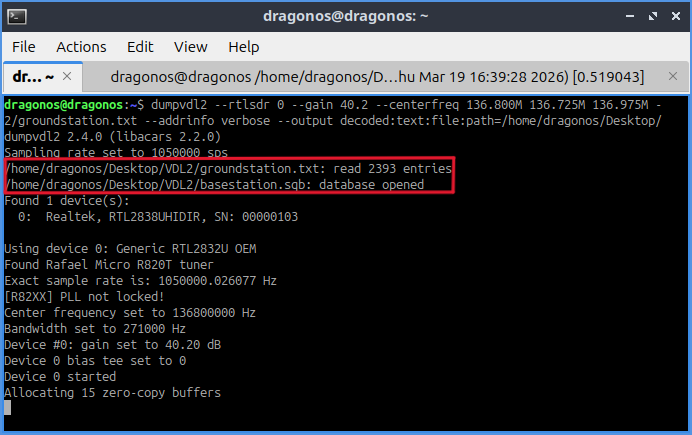
dumpvdl2 --rtlsdr 0 --gain 40.2 --centerfreq 136.800M 136.725M 136.975M --utc --milliseconds --prettify-xml --prettify-json --extended-header --bs-db /home/dragonos/Desktop/VDL2/basestation.sqb --addrinfo verbose --gs-file /home/dragonos/Desktop/VDL2/groundstation.txt --addrinfo verbose --output decoded:text:file:path=/home/dragonos/Desktop/VDL2/dumpvdl2-decoded.log
Command Breakdown
- --rtlsdr 0 — Use the first RTL-SDR connected to the system
- --gain 40.2 — Set tuner gain to 40.2 dB
- --centerfreq 136.800M 136.725M 136.975M — Define monitoring range placing multiple VDL2 channels within sampled bandwidth
- --utc & --milliseconds — Log timestamps in UTC with millisecond precision
- --prettify-xml --prettify-json — Make structured message contents easier to read
- --extended-header — Add extra detail to each decoded entry
- --bs-db — Point to basestation.sqbstrong> file for aircraft information resolution
- --gs-file — Point to groundstation.txtstrong> file for groundstation identification
- --addrinfo verbose — Show expanded aircraft & groundstation information
- --output decoded:text:file:path=... — Write decoded messages as plain text to log file
Optional: Fragment Decoding
One optional switch worth mentioning is --decode-fragments. This tells dumpvdl2 to try decoding message fragments that may otherwise be skipped or left incomplete. That can sometimes reveal a bit more traffic, especially under weak-signal or partial-copy conditions.
What Kind of Messages Can Be Received
Once dumpvdl2 started running, the types of messages you'll see are quite diverse. Most traffic falls into familiar categories:
Aircraft location and movement data
Flight plans, weather reports, maintenance data
Controller-pilot data link messages (CPDLC)
Link control and connection maintenance
These messages include metadata such as aircraft addresses, ground station IDs, timestamps, and protocol headers. It's important to note that not every decoded frame is immediately "readable" or interesting, because VDL2 carries a fair amount of housekeeping data and protocol overhead.
Real-World Observations from Dubai
In Dubai, I monitor 136.725 MHz and 136.975 MHz, the two VDL2 channels available locally. Both frequencies are extremely busy throughout the day, constantly broadcasting a large volume of data. The signal strength is generally strong, but the VHF airband in the area suffers from heavy interference from FM stations.
Compared to regular ACARS, VDL2 channels are not only busier but also carry much more structured and complex data. While some messages are readable, others appear as very long strings of letters and characters that don't immediately make sense. Occasionally, you'll see lengthy lists of numerical values that are technically interpretable but whose meaning isn't obvious without deep protocol knowledge. This mix of structured information and opaque fragments highlights both the richness and complexity of monitoring VDL2 in real-world conditions.
Final Thoughts
VDL2 is a great example of how aviation communications have evolved beyond traditional ACARS. It is faster, busier, and much more structured, making it far more capable for modern datalink traffic. Which makes it more interesting to monitor, because there is always something happening on the channel, and the decoded output often reveals just how much digital traffic is flowing between aircraft and ground stations in real time. The combined technical depth, practical usefulness, and a steady stream of activity that makes it a rewarding mode to explore with an SDR.